
In the era of digital transformation, algorithm-based indicators have become a crucial component of technical analysis. The GainzAlgo Indicator is one such innovative tool. By combining technical data and artificial intelligence, it aims to provide traders with more accurate and reliable analysis.
But what exactly is GainzAlgo, and how does it work? Can it replace classic indicators like RSI or MACD? In this article, we will clearly examine the structure, features, strengths, and limitations of the GainzAlgo indicator. We’ll also show you how to use the GainzAlgo indicator in your daily technical analysis. Stay with us.
- The GainzAlgo Indicator focuses on stable candlesticks, not just moving averages, unlike many other indicators.
- The GainzAlgo V2 allows automatic TP/SL setting with an internal algorithm, eliminating the need for additional tools.
- The GainzAlgo user interface on TradingView, featuring visual signals like arrows and PRZ areas, makes analysis easier for beginners.
- To access the GainzAlgo indicator script, you need private access. The free version is not available on TradingView’s public market.
What is the GainzAlgo Indicator and How Does It Work?
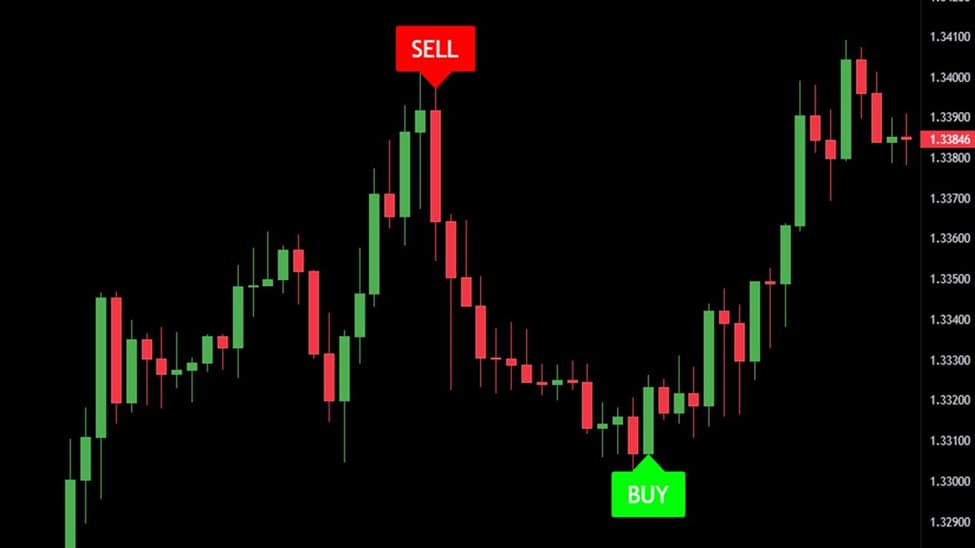
The GainzAlgo Indicator is an algorithmic tool designed to provide more accurate trading signals in financial markets. Unlike traditional tools, it combines multiple technical factors and algorithms to analyse market trends and identify entry and exit points.
GainzAlgo uses historical price data, market volatility, trading volume, and, sometimes, derivative data such as divergences or buy/sell pressure. It processes this data through a proprietary algorithm and displays visual signals on the chart for the user.
These signals typically include:
- Buy/Sell trade entry points
- Warning areas for trend reversals or corrections
- Confirmation of price direction across different timeframes
Since the GainzAlgo Indicator is often custom-designed for platforms like TradingView or MetaTrader, its appearance and settings may vary by version.
Overall, GainzAlgo aims to filter out market noise and provide signals with higher success rates. This is why it is popular among traders looking for intelligent, non-traditional tools.
Source Box
For detailed technical specifications, pricing of different versions, and user performance reviews, visit the official gainzalgo.com website to get more accurate and comprehensive information about this indicator.
Application of the GainzAlgo Indicator in Financial Market Trading
The GainzAlgo Indicator is suitable for both beginners and professionals, as it works across various markets and timeframes. By using advanced algorithms, GainzAlgo analyses price trends, helping you enter or exit trades with more confidence.
Here, we’ll discuss two main applications of this indicator in trading.
Identifying High-Accuracy Entry and Exit Signals
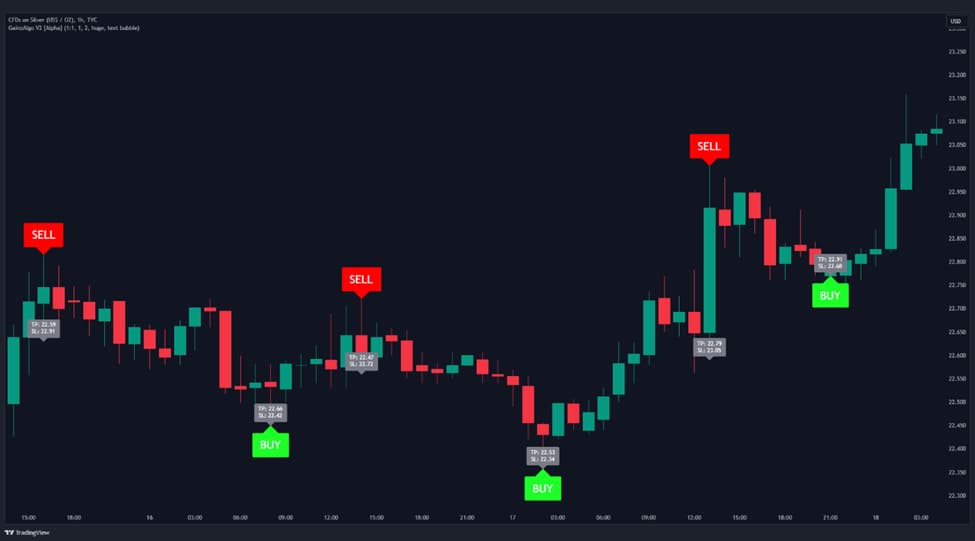
One strength of the GainzAlgo Indicator is its ability to provide high-accuracy Buy and Sell signals. These signals are shown visually as colored arrows or potential reversal zones (PRZ) on the chart.
Unlike some indicators, GainzAlgo signals are non-repainting, reducing trading errors.
For instance, a green arrow indicates a buying opportunity in an uptrend, while a red arrow signals an exit point.
This feature helps improve risk management and prevents entering trades at the wrong time.
Q: How does GainzAlgo behave during high-impact news events and extreme volatility?
A: During high-impact news releases such as FOMC, CPI, or unexpected macro events, GainzAlgo may generate delayed or filtered signals due to its candle stability and noise-reduction logic. This design helps reduce false breakouts but can also cause missed opportunities in fast-moving markets. Advanced traders often disable alerts during major news or wait for post-news confirmation before acting on GainzAlgo signals.
Using the GainzAlgo Indicator in Various Trading Strategies
Traders with different strategies, from scalping to swing trading, can benefit from the GainzAlgo indicator. In scalping, this indicator offers quick signals in lower timeframes like 5M, while in swing trading, higher timeframes like 4H are better.
Combining GainzAlgo with indicators such as RSI to confirm trend strength or Bollinger Bands to identify price ranges can improve results. Backtesting is crucial for ensuring the strategy’s performance. It helps you evaluate how GainzAlgo performs across different market conditions and optimise your strategy.
Q: Is GainzAlgo suitable for fully automated trading, or is it better used as a discretionary confirmation tool?
A: GainzAlgo is not designed to operate as a fully automated trading system on its own. Although its signals are algorithm-driven and non-repainting, it works best as a confirmation tool rather than a standalone decision-maker.
Professional traders combine GainzAlgo signals with market structure, higher-timeframe bias, and clear risk management rules. Using GainzAlgo unthinkingly as an auto-entry system may increase overtrading, especially in ranging or news-driven markets.
Key Insight
GainzAlgo v2 is designed to filter out market noise and analyze only real trends. In volatile markets like crypto or unstable stocks, its signals are more accurate and targeted.
How to Activate and Use the GainzAlgo Indicator on TradingView
To use the GainzAlgo Indicator, purchase it from the official website or trusted sources.
In our GainzAlgo review, we explain how this algorithmic trading indicator provides real-time signals to help traders identify profitable opportunities.
GainzAlgo is a non-repainting indicator, meaning its signals don’t change after the formation, reducing trading errors.
By adding GainzAlgo to your TradingView chart, adjusting its parameters, and using features like alarms, you can optimise your strategies. In this section, we explain how to activate, configure, and use this indicator to improve your trading results.
How to Add the GainzAlgo Indicator to Your TradingView Chart
After purchasing the GainzAlgo Indicator from trusted sources like the official website, you’ll receive an email with the script code.
- First, create a TradingView account (free, though some features require a premium subscription).
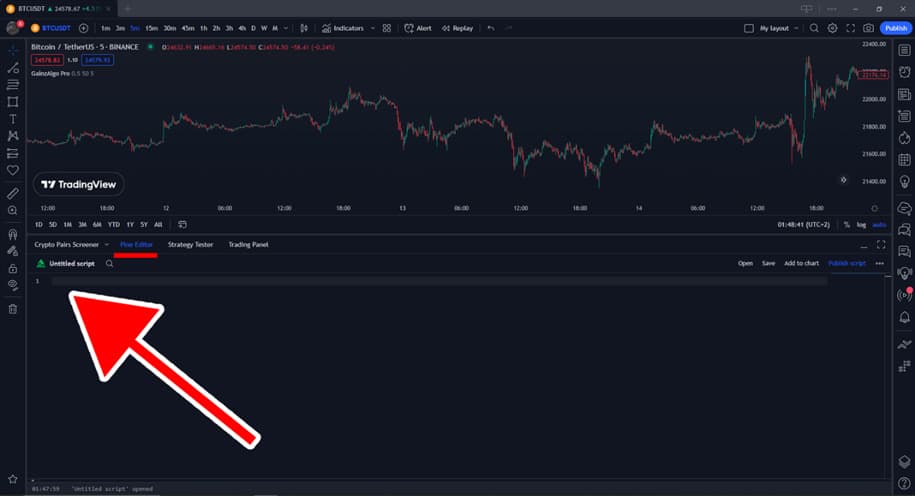
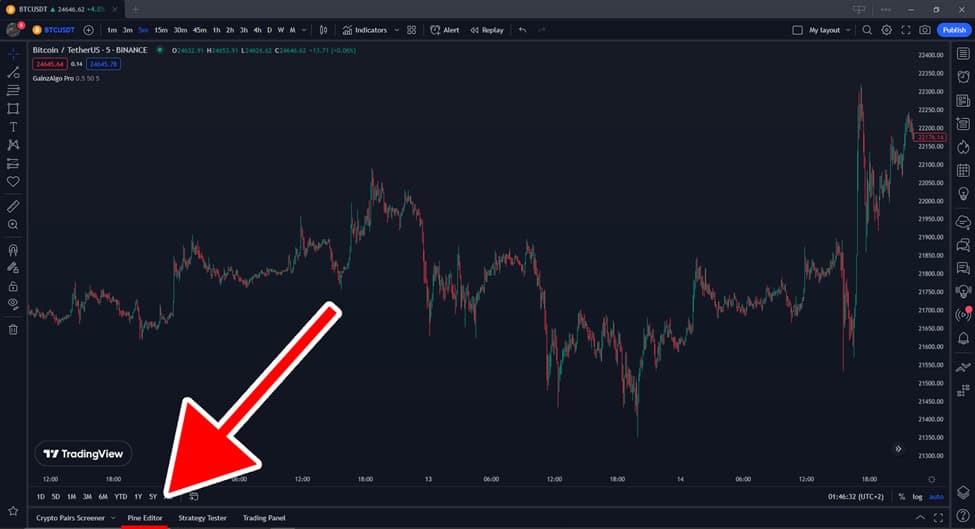
- Log in to your account and go to the Pine Editor tab at the bottom of the chart.
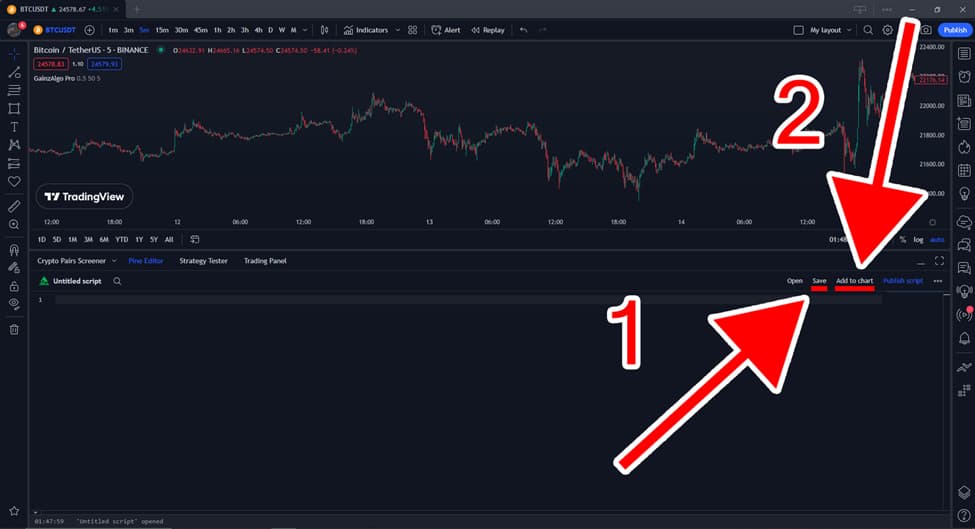
- Copy and paste the script code into the editor,
then click Save and Add to Chart to display the GainzAlgo Indicator.
This simple process lets you quickly start using the tool’s features in your trades.
For those wondering, what is GainzAlgo? It’s a powerful algorithmic trading indicator that can improve your TradingView performance.
Many traders ask, Is GainzAlgo legit? The non-repainting feature and positive reviews confirm its legitimacy. You can also explore GainzAlgo lifetime access, which offers long-term benefits without ongoing fees.
Pro Tip
Although the GainzAlgo Indicator requires a purchase or is Invite-Only, the support team usually provides free installation for users. This installation is done directly on your TradingView account, eliminating the need for manual setup.
Main Settings and Customization of GainzAlgo Indicator Parameters
After adding the GainzAlgo Indicator to your chart, you can customize its parameters by clicking on the indicator’s name and selecting Settings. The default settings include time periods (Candle Delta Length) and the Candle Stability Index, as well as the RSI indicator for overbought and oversold conditions.
For example, you can increase signal sensitivity for short-term trades or decrease it for long-term trades. Performing a backtest on TradingView helps align settings with your trading style and evaluate performance in various markets. Personalizing these settings is key to improving your trading accuracy.
How to Activate Alerts, Visual Signals, and Display PRZ Areas on the GainzAlgo Chart
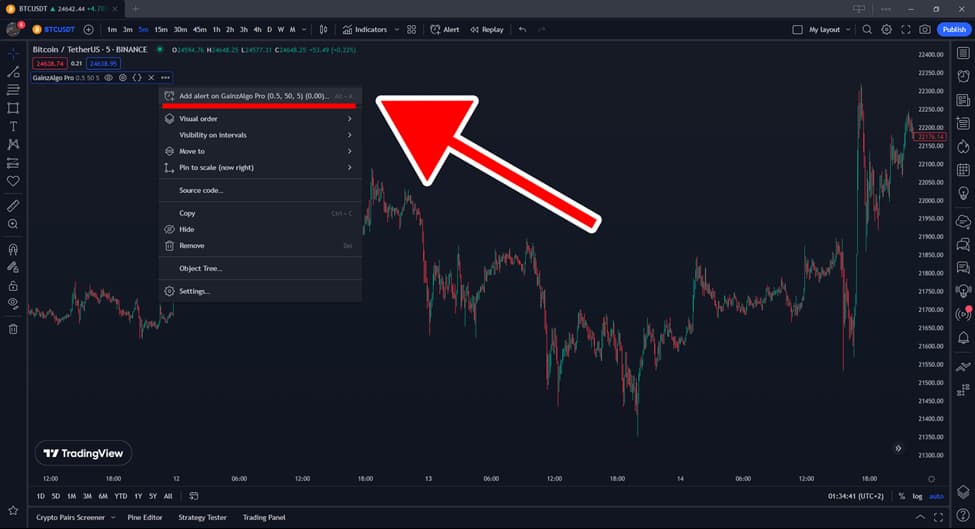
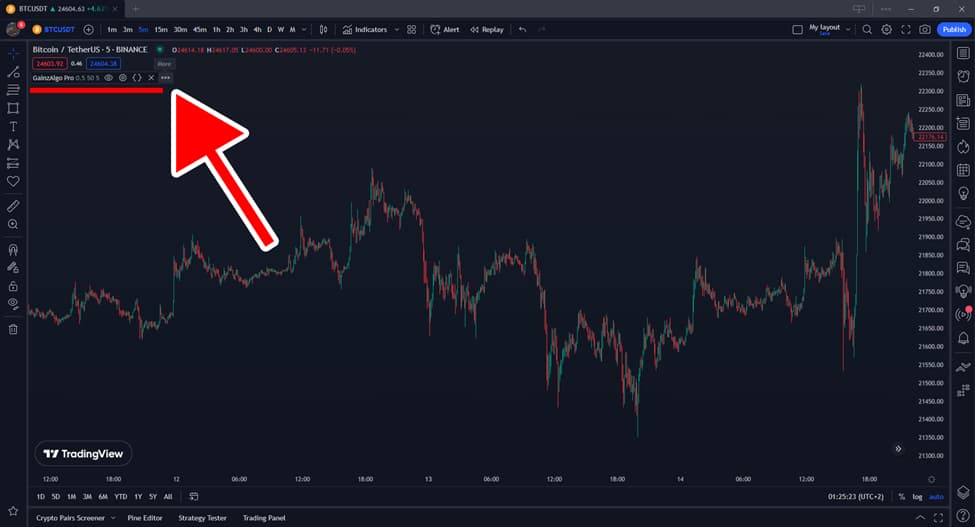
After adding the GainzAlgo Indicator, you can set up alerts to be notified when a signal is triggered. In our GainzAlgo review, we show how easy it is to set up alerts. Click the three dots in the top corner of the indicator panel.
In the dropdown menu, select “Add alert on GainzAlgo.”
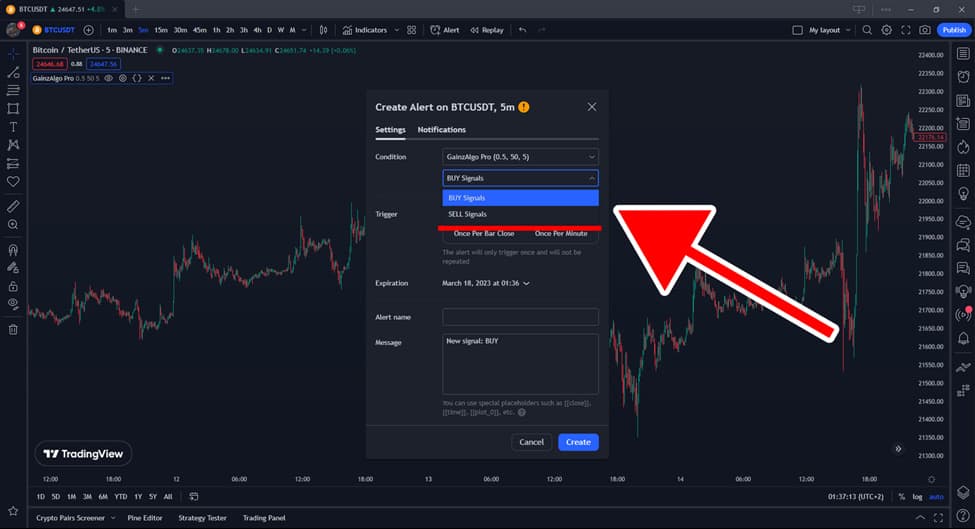
A window will appear, allowing you to specify the signal type (BUY or SELL). After adjusting the parameters, click Create.
These alerts can be sent to your email or phone, keeping you informed without constantly monitoring the market.
The GainzAlgo Indicator, a non-repainting indicator, also displays arrows or visual symbols on the chart to mark potential reversal zones (PRZ).
This helps you clearly see entry and exit points.
For more flexibility, GainzAlgo lifetime access provides long-term benefits without ongoing fees. It’s among the best premium TradingView indicators, making it a solid choice for serious traders.
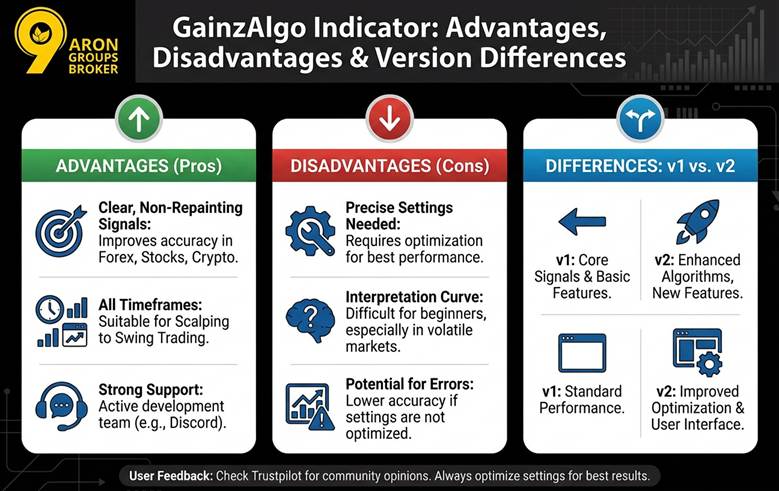
Advantages and Disadvantages of the GainzAlgo Indicator and Differences Between v1 and v2
Using the GainzAlgo Indicator in trading can provide a unique experience for traders.
Like any technical analysis tool, this indicator has its own advantages and disadvantages.
Here, we’ll discuss the pros and cons of this tool and the differences between versions v1 and v2.
This will help you make a better decision when considering the GainzAlgo Indicator. The GainzAlgo Indicator is popular across markets like Forex, stocks, and cryptocurrencies for its non-lagging, non-repainting signals.
It accurately analyses price patterns and provides clear buy and sell signals, thereby improving trading accuracy. The ease of use and compatibility with all timeframes, from scalping to swing trading, make it ideal for both beginners and professionals.
Additionally, the strong support from the development team via platforms like Discord enhances the user experience.
Despite its many benefits, the GainzAlgo Indicator requires precise settings to perform optimally. Without sufficient experience, interpreting signals can be difficult, especially in volatile markets where errors can increase.
Some users have reported lower accuracy in signals if settings are not optimized. For more feedback, visit Trustpilot to see other users’ opinions about this indicator.
Differences Between v1 and v2
The v1 version of the GainzAlgo Indicator is simpler and more suitable for beginners.
However, v2 (Alpha) comes with advanced features like better filters, more accurate signals, and the ability to adjust TP and SL levels.
v2 is better for short-term trades and volatile markets, while v1 is sufficient for simpler strategies.
Q: What type of trader benefits the most from GainzAlgo: beginners or experienced traders?
A: While GainzAlgo’s visual signals and alerts make it accessible for beginners, its full potential is unlocked by experienced traders. Traders who understand price action, liquidity behaviour, and risk-to-reward dynamics can use GainzAlgo to refine entries and reduce emotional bias. Beginners may benefit from it as a learning aid, but relying on it without foundational knowledge can lead to inconsistent results.
Conclusion
GainzAlgo is an advanced, algorithm-based indicator that, despite its simple appearance, uses complex, multi-layered market analysis. In practice, this tool suits traders who follow a systematic approach and do not rely only on signals.
If you’re only looking for green and red lights to enter and exit, GainzAlgo may not meet expectations. However, traders who track price behaviour and combine signals with personal analysis may find it valuable. Ultimately, the actual value of this indicator lies not in its algorithm, but in how you use it.