
icon icon Home
icon icon Accounts
icon icon Quick start
icon icon Symbols

Complete Guide to Building and Managing a Watchlist in TradingView

Author
Abe Cofnas
Abe Cofnas
calendar Last update: 19 December 2025
watch Reading time: 7 min

A watchlist is a practical tool that lets you monitor key market symbols ranging from forex pairs to cryptocurrencies and stocks in one organised panel. It helps traders avoid wasting time jumping between multiple charts and instead track price changes, trading volume, and important news in real time.

If you know how to build and manage your watchlist properly, you’ll not only speed up your analysis, but you’ll also spot profitable trading opportunities faster.

bookmark
Key Points:
  • With a well-organised watchlist, the time spent searching for symbols and switching between charts drops significantly, directly improving your reaction speed to market moves.
  • Categorising and filtering symbols by strategy or risk level helps you allocate capital more intentionally.
  • Combining fundamental data (news, reports) with the technical data shown in your watchlist leads to decisions supported by both analytical approaches.
  • You can keep symbols you plan to trade in the future on your watchlist and revisit them at the right time without forgetting them.
What Is a Watchlist and What Is It Used For?

In the simplest terms, a watchlist is a list of assets or trading instruments that an investor or trader regularly monitors, so they can enter trades when the right conditions arise. For example, a forex trader may track major currency pairs, while a crypto trader might focus on Bitcoin, Ethereum, and popular altcoins.

According to Investopedia, a watchlist can be a powerful tool for identifying trading opportunities, tracking portfolio performance, and even monitoring “hot” stocks or trending assets. With it, you can more quickly spot signals such as a breakout from a price range, a move above the 200-day moving average, or a sudden surge in trading volume.

In practice, a watchlist doesn’t just add structure and focus to your workflow; it can significantly improve your odds of catching better entry and exit points across different markets.

How to Create a Watchlist in TradingView

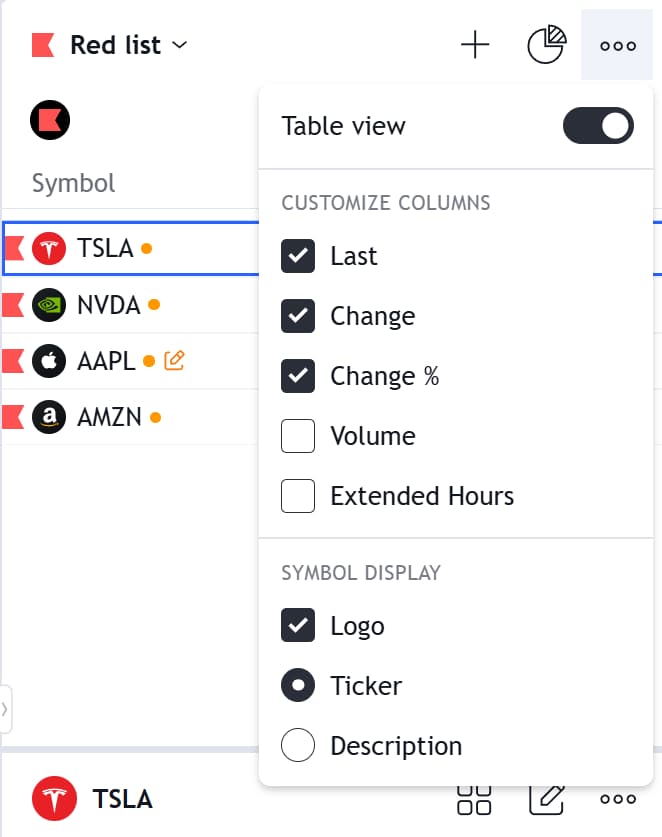
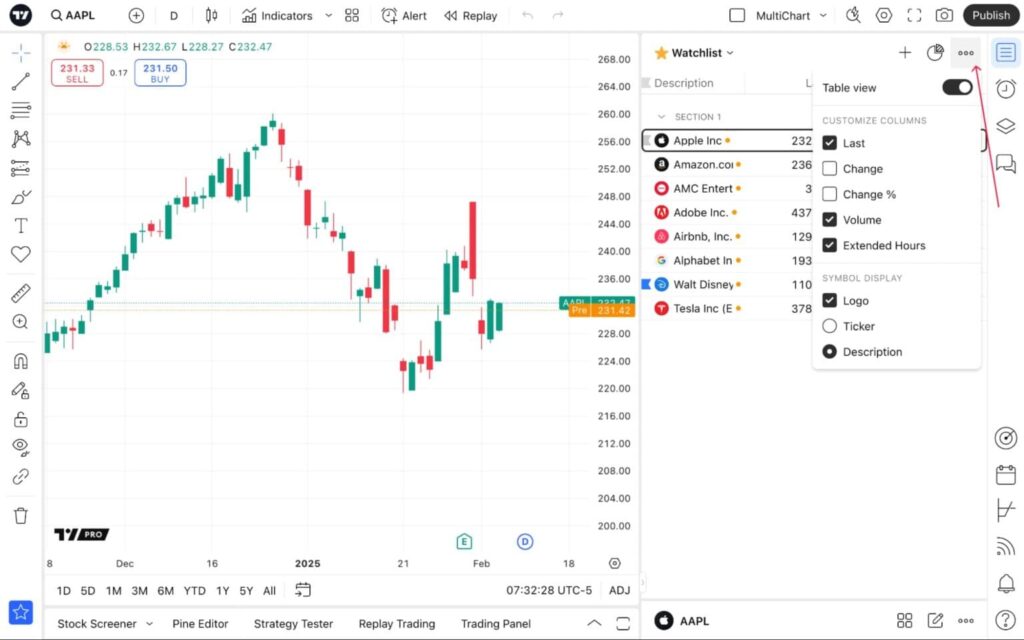
You can open TradingView watchlists (Tradingview)  from the right-hand toolbar. This panel displays key data such as the latest price, price change, and other statistics, which you can customise in the settings.

In the same section, you can manage how symbols are displayed (showing the logo, ticker, or descriptions) and switch the watchlist view between table and row/list layouts.

tradingview watchlist

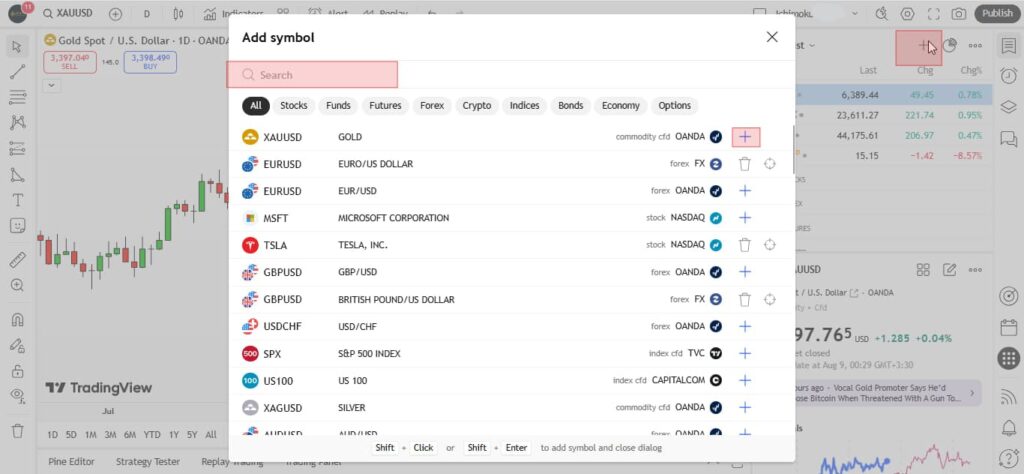
After choosing your preferred display mode, the next step is adding symbols. Click the “+” button to open Symbol Search. To keep your watchlist organised, you can use the available customisation options so you don’t miss any important market changes.

Managing and Customising a Watchlist in TradingView

By managing and customising your TradingView watchlist, you can categorise and sort symbols, and use colour-coding and alerts to tailor the list precisely to your trading needs.

Creating Different Categories (Forex, Crypto, Stocks) in a TradingView Watchlist

Using the Add Section option, you can separate different markets within your watchlist.

  • Open the watchlist you want.
  • Select the symbol above that you want to create a section.
  • Right-click it to open the menu.
  • Choose Add section.
tradingview watchlist

Reordering Symbols and Adding/Removing Symbols in a TradingView Watchlist

For better watchlist management, you should know how to sort symbols and how to add or remove them.

Sorting symbols by clicking column headers

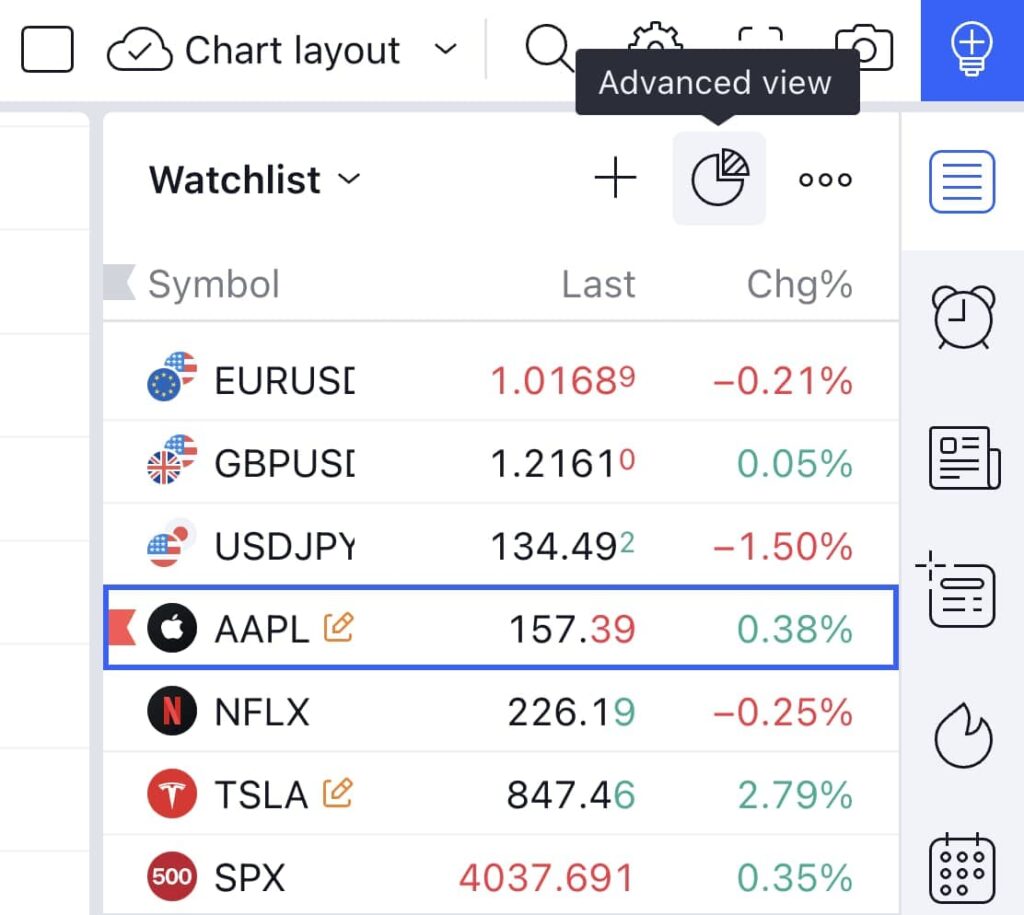
The image below shows the watchlist in table view, where columns such as Last, Chg, and Chg% are visible. By clicking on any column header, you can sort symbols based on that metric, for example, to view the highest or lowest price changes.

tradingview watchlist

How to add a new symbol (Add Symbol)

The second image shows the “+” icon. When you click it, the symbol search screen opens, and you can add a new symbol to your watchlist.

tradingview watchlist

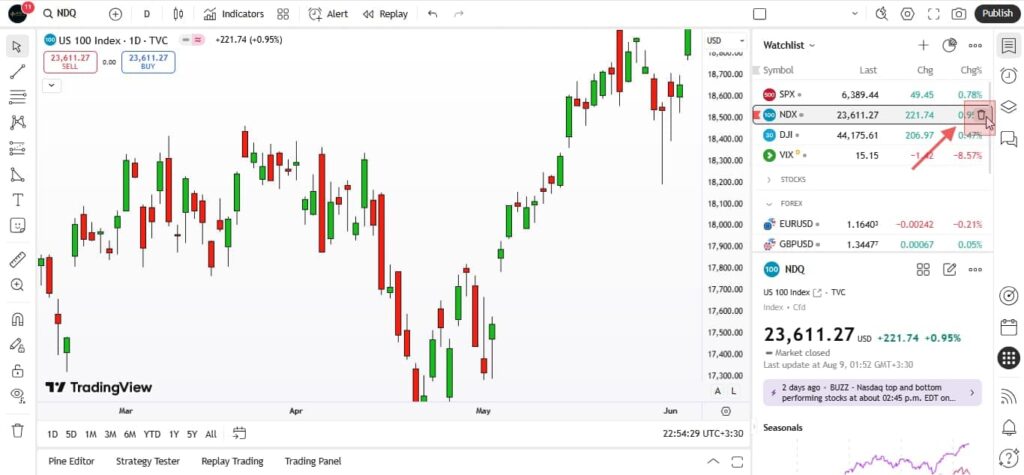
Removing a symbol from the watchlist

In this image, the delete option (such as a trash-bin icon or the Delete key) is highlighted, making it easy to remove unnecessary symbols. You can also select multiple symbols and remove them by pressing Delete or choosing the relevant delete option.

Complete Guide to Building and Managing a Watchlist in TradingView

Using Colours, Icons, and Alerts to Optimise Your TradingView Watchlist

Smart use of colours, icons, and alerts can turn your TradingView watchlist from a simple list into an efficient trading dashboard. Below is how these features work.

Flagging symbols

By colour-coding symbols (flagging), you can separate categories such as high-priority symbols, scalping candidates, or symbols tied to different analyses. This helps your eyes identify key instruments faster.

Complete Guide to Building and Managing a Watchlist in TradingView

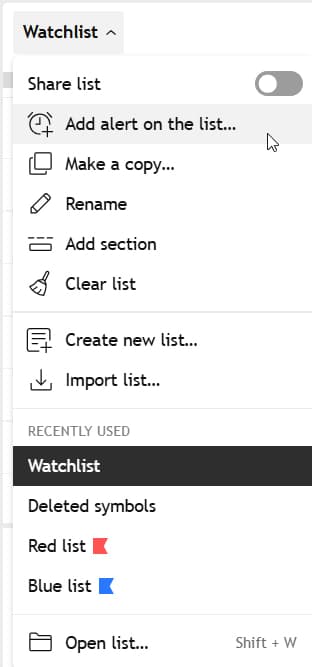
Watchlist Alerts

TradingView’s alert feature allows you to set alerts across your watchlist. In other words, if a symbol’s price reaches a specific level or certain conditions are met, the system immediately sends a notification.

tradingview watchlist
Plan limitations:
  • Premium: up to 2 active alerts;
  • Expert: up to 10 active alerts;
  • Ultimate: up to 15 active alerts.
If a symbol is added after you create an alert, the alert will apply to it as well. If a symbol is removed, its related alert will be disabled. In other words, your alert always stays in sync with your up-to-date watchlist.

Difference Between TradingView Watchlists and MetaTrader Watchlists

In both TradingView and MetaTrader, a watchlist is a tool for monitoring multiple trading symbols at the same time. However, the features, flexibility, and overall user experience differ significantly between the two platforms. Below are the key differences.

TradingView Watchlist

  • Ability to categorise symbols by market (forex, crypto, stocks).
  • Colour-coding (flagging) for quick symbol separation.
  • Group alerts (Watchlist Alerts) for a set of symbols.
  • Full customisation of information columns based on user needs.
  • Cloud-based interface with real-time sync across all devices, with no need to save files.

MetaTrader Watchlist

  • Simple design suited for quick viewing of live prices and changes.
  • Fast data refresh rate.
  • Direct connection to the broker and fast trade execution.
  • More limited customisation, colour-coding, and column options compared to TradingView.
sms-star

If your strategy is built around advanced technical analysis and managing multiple markets at the same time, TradingView’s watchlist is the better choice. But if your focus is fast trade execution and tracking a limited number of symbols, MetaTrader is more efficient.


Golden Tips for Using a TradingView Watchlist More Effectively

By following a few key practices, you can significantly boost the effectiveness of your TradingView watchlist and identify market opportunities faster.

Use Multiple Watchlists at the Same Time

If you trade across different markets such as forex, crypto, and stocks, having separate watchlists helps you monitor each market with more structure and focus. This makes it easier to spot changes and trading opportunities faster without a crowded, cluttered list slowing you down.

Sync with Indicators and Technical Analysis

By linking your watchlist directly to charts and technical analysis tools, you can quickly move from price changes to a deeper chart review. This synchronisation lets you use watchlist data as the starting point for real-time analysis, enabling faster decision-making.

Share Your Watchlist with Other Traders

TradingView’s Share Watchlist feature allows you to share your list of symbols with teammates, educational groups, or other analysts. This is especially useful for analysis teams, because everyone can focus on the same set of symbols and stay aligned in their conclusions.

Conclusion

In summary, TradingView’s watchlist is a powerful tool for organising your trading workflow and quickly monitoring symbols across different markets.

By using features such as categorisation, colour-coding, group alerts, and integration with technical analysis tools, you can significantly improve both your reaction speed and decision-making accuracy. At the same time, understanding each platform’s limitations and choosing the most effective combination can multiply your overall trading efficiency.

Continue Reading
not-found
calendar 19 December 2025
Rate this article
Plugin not installed

Leave a Reply

Your email address will not be published. Required fields are marked *

No thanks