
icon icon Home
icon icon Accounts
icon icon Quick start
icon icon Symbols

Building an Intraday Trading Edge with Refined MACD Settings

Author
Abe Cofnas
Abe Cofnas
calendar Last update: 14 April 2026
watch Reading time: 12 min

Default MACD settings can feel clean on daily charts, but on intraday timeframes, they often react too late, after the move you wanted is already half done. So the real question is: do you want faster MACD settings for intraday trading that catch momentum earlier, or do you want fewer signals and accept that you will miss a lot of turns?

bookmark
Key Takeaways

keaways

  • MACD is built from exponential moving averages (EMAs) and a signal line; the classic inputs are 12-26-9.
  • Shorter EMA periods make MACD react faster, but also increase noise and false signals.
  • For intraday, the best MACD settings for day trading depend on the timeframe and volatility. There is no one perfect input set.
  • The MACD histogram is often more useful than line crossovers for intraday momentum because it shows acceleration/decay earlier.
  • Faster settings require tighter rules: trend filters, price action confirmation, and strict risk management.
  • Any optimised MACD settings should be backtested and validated out-of-sample to avoid curve fitting.
sms-star

Important note: Faster signals are not better signals. They are earlier signals. You pay for that with more wrong turns.
Core MACD Parameters and Calculation Logic

Before tuning MACD indicator for intraday use, you need to understand what the inputs actually control. MACD is not a mystery indicator. It is a moving-average relationship tool.

Understanding the 12-26-9 MACD Parameters

According to Investopedia, the standard MACD configuration uses:

  • Fast EMA: 12
  • Slow EMA: 26
  • Signal line: 9 (EMA of the MACD line)

What those numbers mean in plain terms:

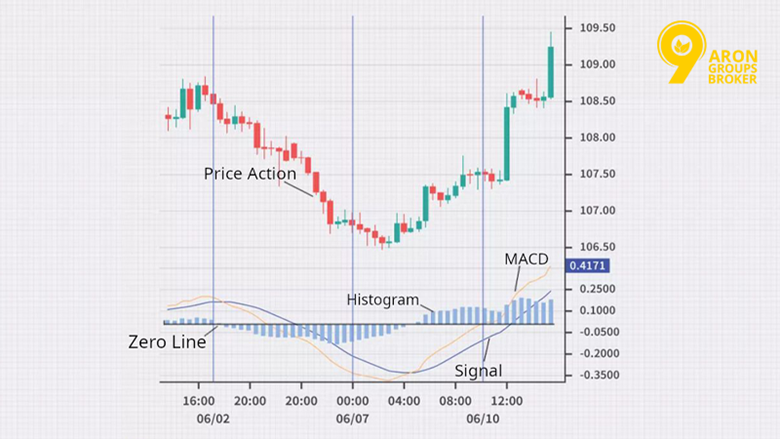
  • The MACD line measures the gap between the fast and slow EMA.
  • The signal line smooths that MACD line.
  • The histogram shows the distance between MACD and the signal line.
12-26-9 MACD Parameters

So when you change MACD input values, you are changing how quickly that gap reacts to price changes.

How EMA Periods Influence Signal Speed

EMA periods are your speed dial.

  • Lower periods = faster response
  • Higher periods = slower response, smoother signals

In MACD terms:

  • Reducing the fast EMA makes the MACD line jump more quickly.
  • Reducing the slow EMA makes the baseline move faster, too.
  • Reducing the signal EMA makes crossovers appear sooner, but also more frequently.

A useful mental model:

  • Fast EMA controls reaction.
  • Slow EMA controls the trend context.
  • Signal line controls confirmation delay.

Why Default MACD Settings Can Be Slow for Intraday Trading

12-26-9 was popularised for longer-term charting. It works fine for slower swings, but in intraday trading, it often signals after momentum has already expanded and begun to fade.

Why it can feel late intraday:

  • Intraday moves are shorter and faster.
  • A slow baseline (26 EMA) can lag the move.
  • Line crossovers often occur after a big part of the impulse is done.

That’s why traders look for:

  • Fast MACD settings for 1–5 minute charts
  • More balanced day trading settings for 15–60 minute charts

But faster settings only work if you accept the trade-off: more signals, more noise.

How MACD Settings Affect Speed and Sensitivity

When people ask for optimised MACD settings, they are really asking how to control two variables: how quickly MACD reacts, and how reliable the signals remain.

The Link Between MACD Input Values and Signal Responsiveness

MACD responsiveness increases when:

  • Fast EMA period decreases
  • Slow EMA period decreases
  • Signal EMA period decreases

But each adjustment has a different effect:

  • Lower fast EMA gives quicker turns.
  • Lower slow EMA reduces lag but can weaken trend context.
  • Lower signal EMA gives more crossovers, which can be noisy.

This is why custom MACD settings should match your style:

  • Scalping needs faster inputs.
  • Standard day trading can use moderate tuning.
  • Trend-following intraday often prefers a slower signal line for stability.

Fast MACD Settings for Intraday Momentum

Fast MACD settings are used to capture momentum earlier on short charts.

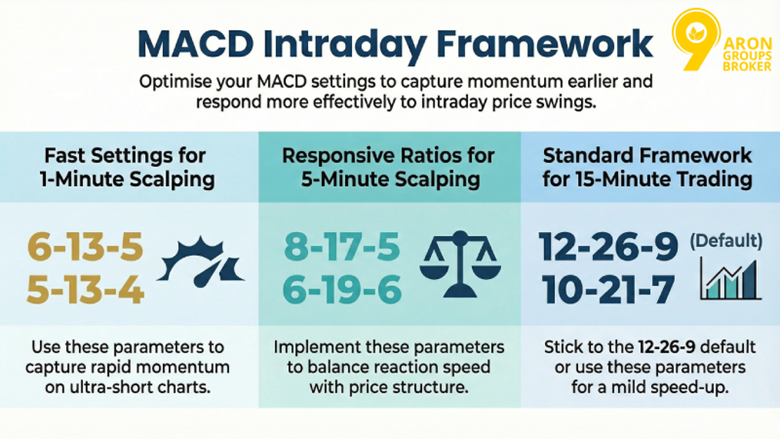
A practical starting framework (not a promise, a baseline for testing):

Building an Intraday Trading Edge with Refined MACD Settings

Why these ranges make sense:

  • They shorten the EMA periods enough to respond within intraday swings.
  • They keep the slow EMA far enough from the fast EMA to maintain structure.
sms-star

Remember: Treat these as test candidates. Your instrument’s volatility matters.


To make fast MACD usable, add at least one filter:

  • Trade only in the direction of a higher timeframe trend, or
  • Use VWAP/EMA trend filter, or
  • Confirm with a clear price action break (higher high/lower low).

The Trade-Off Between Early Signals and False Signals

This is the core trade-off you cannot escape:

  • Earlier signals: more trades, faster entries, more whipsaw
  • Slower signals: fewer trades, later entries, more missed turns

How to manage it:

  • In trend conditions, fast MACD can work well because pullbacks resolve cleanly.
  • In range conditions, fast MACD often turns into a noise generator.

So the best MACD settings for intraday trading are not one number set. It is:

  • a setting + a market condition filter + a risk rule.

Choosing the Best MACD Settings for Intraday Trading Styles

There is no single best MACD setting for day trading that works everywhere. Settings should match your timeframe, holding time, and tolerance for noise. Short charts need faster inputs. Longer intraday charts can use slower, cleaner inputs. MACD’s behaviour changes because it is built from EMAs and a signal line.

MACD Settings for Scalping (1–5 Minute Charts)

Scalping needs earlier momentum signals. That usually means reducing EMA periods and often tightening the signal line too. The cost is more false crossovers and more histogram flicker.

Practical fast MACD candidates (starting points to test):

  • 1-minute: 5-13-4 or 6-13-5
  • 3–5 minutes: 6-19-6 or 8-17-5

Why these work as candidates:

  • They shorten the lag relative to intraday impulses.
  • They still keep a gap between fast and slow EMAs, so the MACD line is not pure noise.

How to trade scalping MACD without self-sabotage:

  • Use the histogram for momentum acceleration/decay, not just line crossovers. MACD in Tradingview explanation highlights the histogram as the distance between the MACD and the signal line, which is why it helps you see momentum shifts.
  • Add a trend filter (VWAP, higher timeframe bias, or simple structure).
  • Set tight invalidation. Fast MACD is useless without strict risk rules.
sms-star

Important note: If you scalp with a fast MACD in a range, you will overtrade. That is not a settings problem. It is a regime problem.


Best MACD Settings for Day Trading (15–60 Minute Charts)

Standard day trading usually aims for fewer, higher-quality signals. You can keep 12-26-9 or slightly speed it up, depending on the instrument.

Practical day trading MACD candidates:

  • 15-minute: 10-21-7 or 12-26-9
  • 30–60 minutes: 12-26-9 (often still reasonable)

Why is this range common:

  • It smooths noise enough to stay aligned with intraday trend swings.
  • It reduces the number of meaningless crossovers that dominate short charts.

A good rule for day trading:

  • Treat MACD as confirmation, not a trigger.
  • Let price action define the level. Let MACD confirm momentum.
sms-star

Tip: On higher intraday charts, MACD is best as a permission slip, not a steering wheel.

Adapting MACD Settings to Market Conditions

Settings are only half the puzzle. Market conditions decide whether MACD behaves like a helpful momentum tool or a whipsaw machine. Because MACD is EMA-based, it works better when momentum persists and worse when price chops.

Optimised MACD Settings for Trending Markets

Trends are where MACD can shine intraday. In a trend, pullbacks tend to resolve, and momentum cycles are clearer.

How to optimise for trending conditions (without curve fitting):

  • Use a moderately fast MACD that can catch pullback continuations.
  • Use histogram expansion to confirm re-acceleration.
  • Require structure confirmation (higher low in uptrend, lower high in downtrend).

Practical approach:

  • Scalpers: use your fast set (e.g., 6-13-5) but only trade with the trend.
  • Day traders: use 10-21-7 or 12-26-9, and focus on the strongest swings.

If you want one clean rule:

  • In an uptrend, you want MACD to stay mostly above zero and histogram dips to recover quickly.
  • In a downtrend, you want MACD to stay mostly below zero, and histogram bounces to fail.

MACD Tuning in Ranging or Low-Volatility Sessions

Ranges punish fast MACD settings. You get constant crossovers with no follow-through.

In low-volatility chop, you have two options:

  1. Slow it down to reduce signals, or
  2. Stop using MACD as a trigger and use it only to confirm breakouts.

Practical tuning options:

  • Increase the signal line smoothing (higher signal EMA).
  • Keep the fast EMA modest, so the line does not flicker.

But the smarter move is often behavioural:

  • Trade less.
  • Wait for range boundaries and a real breakout.
  • Use MACD histogram only as a momentum check.

How Intraday Volatility Impacts MACD Performance

Volatility changes the quality of MACD signals.

  • In higher volatility, MACD reacts more, and crossovers happen more often.
  • In lower volatility, MACD compresses, and signals become less meaningful.

So settings that work on:

  • Nasdaq futures / high-beta stocks may be too fast for slow large-caps.
  • A calm session may require slower settings than a news-driven session.

A practical volatility-aware rule:

  • If candles are large and swinging, reduce position size and demand stronger confirmation.
  • If the session is quiet, be patient and avoid forcing MACD crossovers.
sms-star

Remember: The same MACD settings can look brilliant one day and useless the next. That’s volatility talking, not your intelligence.


Using the MACD Histogram for Intraday Confirmation

For intraday trading, the MACD histogram is often more useful than waiting for line crossovers. Tradingview explains that the histogram is simply the difference between the MACD line and the signal line, so it reacts as momentum strengthens or fades. TradingView’s MACD reference explains this relationship directly.

Reading Histogram Expansion for Momentum Acceleration

Histogram expansion means the bars are growing away from zero. That usually signals momentum acceleration in the current direction.

How to use it intraday (simple rules):

  • Trend continuation: after a pullback, watch for histogram bars to stop shrinking and start expanding again. That often aligns with momentum returning.
  • Breakout confirmation: if price breaks a level and the histogram expands in the breakout direction, the move has more engine behind it.
  • Avoid weak moves: if price breaks a level but the histogram stays flat or shrinks, treat it as lower quality.

A practical habit:

  • Don’t trade the first green/red bar.
  • Look for two to three bars expanding in the same direction, especially on 1–5 minute charts.

Spotting Momentum Shifts Before Line Crossovers

Line crossovers are slower because they require MACD to cross the signal line. The histogram can show the shift earlier because it changes the moment the gap between MACD and signal starts to shrink.

What an early shift looks like:

  • Histogram bars get smaller toward zero, even if MACD is still above/below the signal.
  • The market is losing momentum before the crossover prints.

How to trade it without overreacting:

  • Use histogram contraction as an exit/management clue, not an instant reversal entry.
  • If you want reversal trades, demand extra confirmation from price action (break of structure, failed breakout, trendline break).
sms-star

Important note: Histogram contraction happens in normal pullbacks, too. Treat it as a warning, not a verdict.


Multi-Timeframe Confirmation Without Signal Conflict

Multi-timeframe MACD helps you avoid the classic intraday trap: a fast MACD on the 1-minute says buy while the broader trend is still bearish. Your goal is alignment: a higher timeframe gives direction, a lower timeframe gives timing.

Aligning MACD Settings Across Timeframes

You have two workable approaches. Pick one and stay consistent.

Approach A: Same settings across timeframes

  • Use one MACD configuration (e.g., 12-26-9 or 10-21-7) on all timeframes.
  • This keeps interpretation consistent.
  • Signals arrive later on lower timeframes, but they are cleaner.

Approach B: Faster on LTF, standard on HTF

  • Use a standard MACD on HTF to define bias.
  • Use a faster MACD on LTF to time entries.
  • This reduces lag without losing the bigger picture.

Why this works:

  • MACD is based on EMAs. Different timeframes naturally change how fast the indicator behaves, even with the same inputs.
sms-star

Tip: Multi-timeframe confirmation is not more signals. It is fewer conflicts.


Using Higher Timeframe Bias to Validate Intraday Entries

This is the practical method day traders actually need.

  • Pick your HTF bias (15m or 60m is often enough)
    • Is MACD generally above zero and rising? Bullish bias.
    • Is MACD generally below zero and falling? Bearish bias.
  • Only take intraday entries that match the bias
    • In bullish bias, you buy pullbacks when the histogram re-expands upward.
    • In a bearish bias, you sell rallies when the histogram re-expands downward.
  • Use price action as the final trigger
    • Support/resistance, break-and-retest, or simple structure shifts.

This approach reduces false signals because you stop taking every crossover and start trading with the dominant momentum.

sms-star

Important note: If HTF is flat and MACD is chopping around zero, your best decision is often no trade. That is a regime filter.


Conclusion

The best MACD settings for intraday trading are not a magic set of numbers. They are a combination of: settings that match your timeframe, a filter that matches market conditions, and rules that control risk. Use faster settings for 1–5 minute scalping only when you can handle noise. Use more stable settings for 15–60 minute day trading. Then lean on the MACD histogram for momentum confirmation and use a higher timeframe bias to avoid conflicting signals. Keep it simple, test your inputs, and let discipline do the optimisation.

Continue Reading
not-found
calendar 14 April 2026
Rate this article
Plugin not installed

Leave a Reply

Your email address will not be published. Required fields are marked *

No thanks