

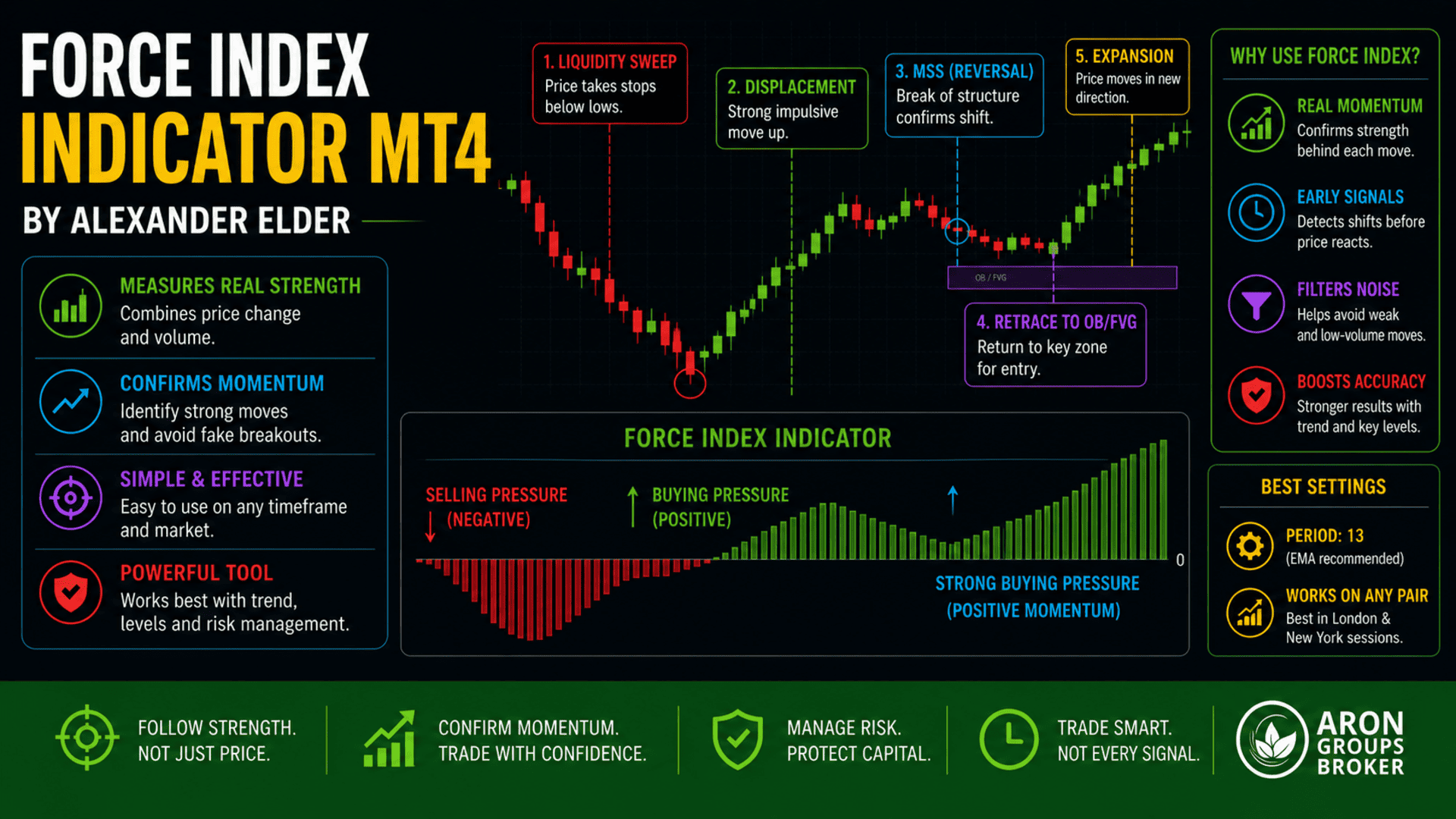




The Force Index Indicator MT4 is one of the most practical tools for understanding the real strength behind price movements. Developed by Alexander Elder, this indicator combines price action and volume into a single value, helping traders see whether buyers or sellers are truly in control. Unlike many lagging indicators, the Force Index gives insight into momentum driven by actual market participation, not just price patterns.
In this guide, you will learn how the Force Index works, how to install it on MT4, and how to use it in real trading scenarios with clear examples.

- The Force Index measures real momentum by combining price movement with volume.
- It works best as a confirmation tool alongside trend analysis and key levels.
- Signals are more reliable during high-volume sessions, such as those in London and New York.
- Pullback entries with Force Index confirmation offer better risk-to-reward than chasing moves.
- Consistent risk management and avoiding low-volume conditions are essential for long-term success.
What Is the Force Index Indicator MT4?
According to indicatorspot, the Force Index Indicator MT4, created by Alexander Elder, is a momentum-based tool that combines price movement and volume to gauge the underlying strength of a market move. Instead of only tracking price direction, it answers a more important question: how strong is that move? This makes it especially useful for identifying real breakouts versus weak, low-volume movements.
On MetaTrader 4, the Force Index is typically displayed as an oscillator that moves above and below a zero line. When the indicator rises sharply, it suggests strong buying pressure. When it drops, it signals increasing selling pressure.
How the Force Index Measures Market Strength
The Force Index measures how much “force” buyers or sellers apply to the market. It does this by multiplying price change by volume, which highlights whether moves are supported by real participation.
In simple terms:
- Strong upward move + high volume → strong bullish force
- Strong downward move + high volume → strong bearish force
- Weak move + low volume → low conviction
Example:
Gold (XAUUSD) moves from $2,000 to $2,015 with rising volume → Force Index shows a strong positive spike → confirms bullish strength.
But if price rises with low volume, the indicator stays flat → suggesting weak momentum.
This helps traders avoid false breakouts and focus only on moves backed by institutional activity.
How the Force Index Indicator Works
The Force Index Indicator MT4 works by translating raw price and volume data into a single line that fluctuates around zero. This line reflects the balance between buying and selling pressure in real time.
Unlike indicators such as RSI or MACD, which are derived from price averages, the Force Index directly incorporates volume. This gives it an edge in identifying whether a move is supported by real market participation.
Formula Behind Force Index
According to fbs, the Force Index is calculated using a simple but powerful formula:
Force Index = (Current Close – Previous Close) × Volume
This formula captures both the direction and strength of price movement.
Understanding Positive and Negative Values
The zero line is the most important reference point in the Force Index.
According to Stockcharts, positive and negative values of the force index mean:
- Positive Value → buyers dominate
- Negative Value → sellers dominate
However, the signal strength depends on how far the indicator moves from zero.
Q: Is crossing the zero line enough for entry?
A: No. Use it with trend direction or support/resistance. Zero-crossing alone can produce false signals.
How to Download and Install Force Index Indicator MT4
The Force Index Indicator MT4 is available by default in MetaTrader 4, so in most cases, you do not need to download any external file. However, some traders prefer custom versions with smoothing or manual alerts.
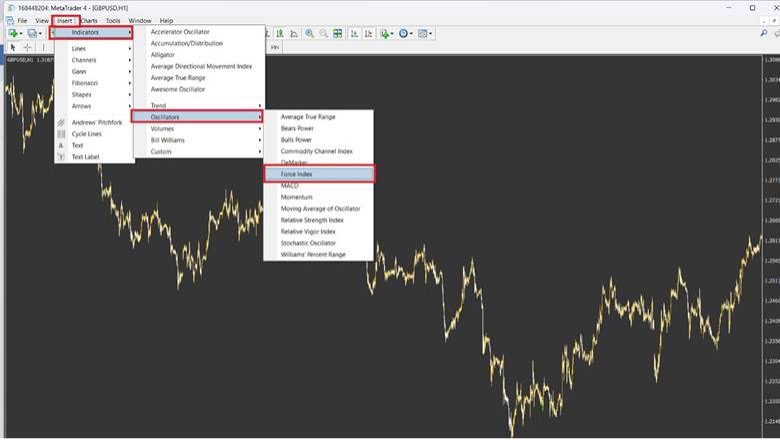
To access the built-in version on MT4, open your platform and follow this process:
- go to Insert → Indicators → Oscillators → Force Index.
- Once selected, the indicator will appear in a separate window below your chart.
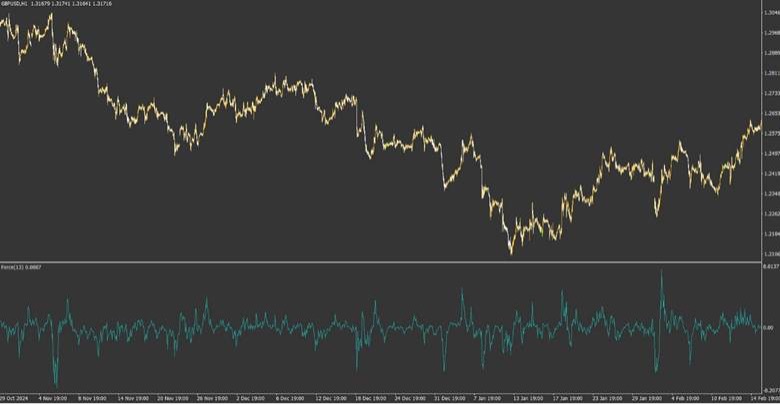
Free Download and Setup on MetaTrader 4
For most traders, the default MT4 Force Index is sufficient. However, custom versions may offer additional features such as alerts, multi-timeframe signals, or enhanced smoothing.
Setup process in practice:
- Download the indicator file (.ex4) from a reliable source such as MQL5.
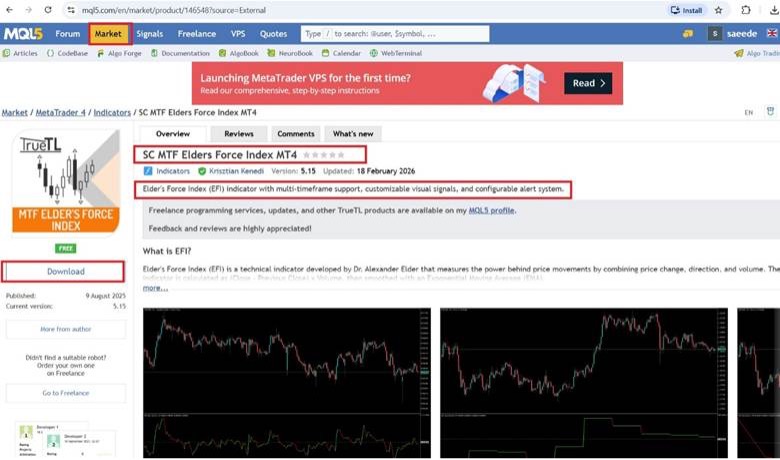
- Open MT4 → File → Open Data Folder
- Navigate to MQL4 → Indicators
- Paste the file
- Restart MT4 or right-click “Navigator” → Refresh
- Drag and drop the indicator onto your chart
After installation, adjust the parameters based on your trading style.
Q: Do I need a custom version to trade effectively?
A: No. The default Force Index works well. Custom versions are optional for advanced features.
Best Force Index Settings for MT4
The most widely used setting for the Elder Force Index is a 13-period Exponential Moving Average (EMA) applied to the raw values. This helps smooth out volatility and produces clearer signals.
Common settings:
- Period: 13 (standard)
- Applied to: Close price
- MA method: EMA
For short-term trading (e.g., M15 or M5), some traders use lower values, such as 2 or 5, to capture momentum more quickly. For swing trading, higher values, such as 20 or 50, can filter out noise.
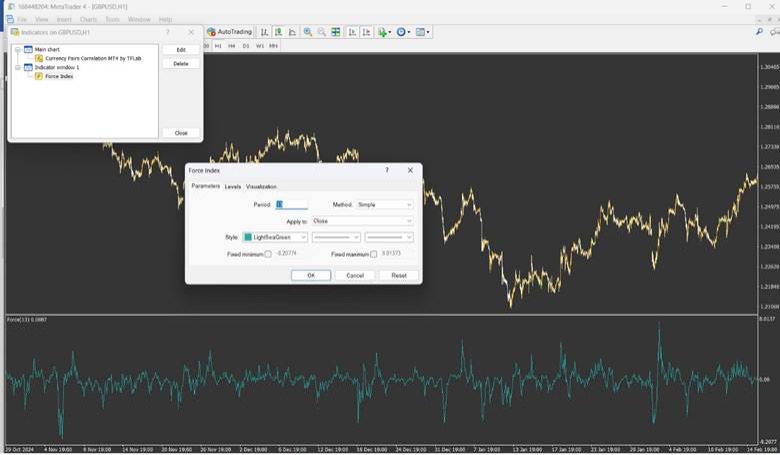
Lower periods in the force index setting generate faster signals but tend to produce more noise, while higher periods provide smoother, more reliable signals at the cost of fewer trading opportunities.
Force Index MT4 Trading Strategy
The Force Index MT4 is most effective when used as a confirmation tool rather than a standalone signal generator. It helps traders align entries with real market momentum.
A simple and effective approach is to combine trend direction, force index confirmation, and key levels (support/resistance or liquidity zones).
The strategy focuses on trading with the trend, not against it.
Trend Confirmation Using Elder Force Index
The Force Index is highly effective for confirming trends.
Basic logic:
- Force Index above zero → bullish pressure
- Force Index below zero → bearish pressure
However, the key is consistency. A strong trend is confirmed when the indicator remains on one side of the zero line and forms higher highs (in bullish trends) or lower lows (in bearish trends).

Use the Force Index to filter trades. Only trade in the direction of confirmed momentum.
Entry Strategy with Pullbacks and Momentum
The most reliable entries occur during pullbacks within a strong trend.
Execution logic:
- Step 1: Identify trend (e.g., bullish)
- Step 2: Wait for a pullback in price
- Step 3: Watch the Force Index dip toward zero or slightly negative
- Step 4: Enter when the Force Index turns back in the trend direction
This setup avoids chasing price and instead aligns entries with renewed momentum.
Real Trading Scenario: Force Index Pullback Entry
Imagine EUR/USD is in a clear uptrend:
– Price is above the 50 EMA
– Market pulls back
– Force Index drops toward zero
At this point:
– A bullish candle forms
– Force Index turns positive again
This is a high-probability, low-risk entry aligned with trend momentum.
Combining Force Index with Other Indicators
The Force Index Indicator MT4 becomes significantly more effective when combined with other technical tools. On its own, it measures momentum and volume strength, but when aligned with trend indicators or oscillators, it helps filter false signals and improves entry accuracy.
The goal is not to overload your chart, but to create confirmation layers. A strong setup typically includes trend direction, momentum confirmation, and a clear entry trigger. By combining the Force Index with indicators such as Moving Averages, RSI, or MACD, traders can determine whether a move is supported by both the price structure and underlying strength.
The combination of Force Index and Moving Average Strategy
this combination is one of the simplest and most reliable ways to trade with the Force Index. The Moving Average defines the trend, while the Force Index confirms momentum.
Basic logic:
- Price above Moving Average → bullish trend
- Price below Moving Average → bearish trend
- Force Index confirms strength in the same direction
In this setup, the Moving Average acts as a directional filter, while the Force Index ensures that momentum supports the trade.
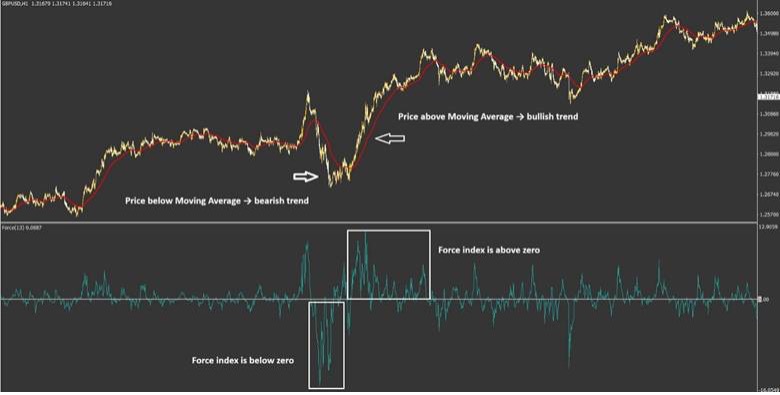
Combination of Force Index, RSI, and MACD Signals
Combining the Elder Force Index with RSI or MACD adds a second layer of confirmation based on momentum and overbought/oversold conditions.
With RSI:
- RSI below 30 + Force Index turning positive → potential buy
- RSI above 70 + Force Index turning negative → potential sell
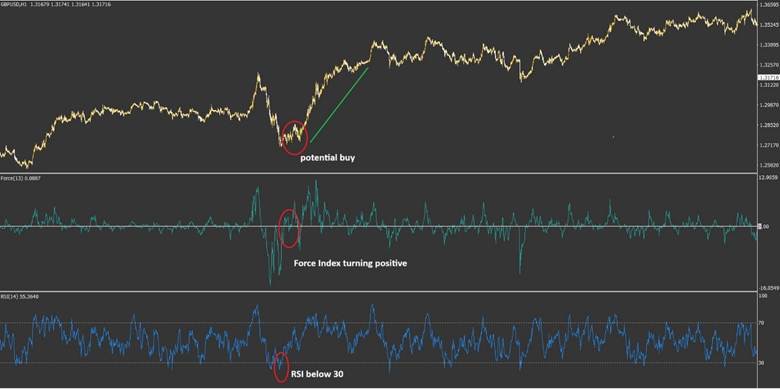
With MACD:
- MACD crossover + Force Index confirmation → stronger signal
- Divergence in both indicators → higher probability of reversal
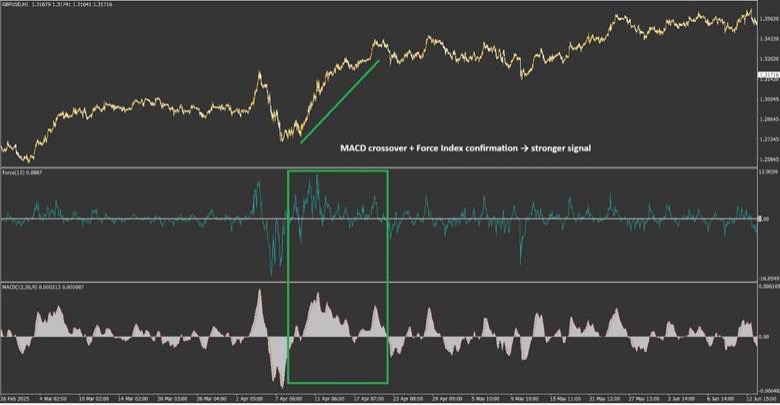
Q: Should all indicators agree before entering?
A: Not necessarily. Two aligned signals are usually enough. Too many indicators can delay entries. The key is confluence, not complexity.
Force Index in Forex, Gold, and Crypto Markets
The Force Index Indicator MT4 works across different markets, but its effectiveness depends on the quality of volume and session behaviour. It performs best in markets with consistent liquidity and clear participation, such as Forex and Gold.
In Forex, volume is tick-based rather than real exchange volume, but the indicator still provides useful insights into relative strength. EUR/USD is one of the most suitable pairs for the Force Index, given its high liquidity and tight spreads.
In Gold and indices, where institutional activity is stronger during specific sessions, the Force Index often produces clearer signals. Gold (XAUUSD) reacts strongly to volume and momentum, making it an ideal market for the Force Index.
In crypto markets, the indicator can still be used, but results may vary due to fragmented liquidity and 24/7 trading conditions.
Use the Force index indicator during the London and New York sessions for more reliable signals.
Pros and Cons of Force Index Indicator MT4
The Force Index Indicator MT4 is a powerful tool for measuring momentum, but like any indicator, it has both strengths and limitations. Understanding these clearly helps traders use it effectively rather than relying on it blindly.
Advantages of Volume Price Force Analysis
One of the key strengths of the Elder Force Index is that it captures real market participation. Unlike indicators that rely only on price averages, it reflects the intensity behind each move.
Key advantages include:
- Combines price and volume
- Early momentum detection
- Effective trend confirmation
- Works across multiple markets
Limitations and Common Mistakes
One major limitation is its sensitivity to short-term fluctuations. On lower timeframes, the indicator can produce frequent signals that do not lead to meaningful price movement. This can lead to overtrading if not properly filtered.
Another issue is relying on it without context. Using the Force Index without considering trend, support/resistance, or liquidity levels often leads to false entries.
Common mistakes:
- Entering trades based only on zero-line crossovers
- Ignoring the higher timeframe trend direction
- Using very low periods (e.g., 2) without filtering noise
- Applying it in low-volume or niche markets
The Force Index shows strength, not direction, by itself. Direction must come from structure or trend.
| Advantage | Limitation |
|---|---|
| Combines Price and Volume | Sensitive to Noise |
| Momentum Detection | Not a Standalone Indicator |
| Trend Confirmation | False Signals in Ranging Markets |
| Multi-Market Usage | Over-Optimisation Risk |
Practical Tips to Improve Force Index Results
To get consistent results with the Force Index Indicator MT4, traders need more than just signals. The real edge comes from how the indicator is applied within a structured process. This includes timing, market conditions, and disciplined execution.
The Force Index performs best when used as a confirmation tool rather than a trigger. Always align it with trend direction, key levels, and active trading sessions such as London and New York. Avoid using it in isolation, especially in choppy or low-volume environments where signals become less reliable.
Another important factor is patience. Many traders react to the first signal they see. A more effective approach is to wait for a pullback and confirmation, ensuring that momentum is sustained rather than temporary.
Risk Management
The Force Index can highlight high-momentum setups, but no indicator guarantees accuracy. Every trade must be structured with controlled risk.
A common and effective model is fixed risk per trade.
Stop-loss placement should always be based on market structure, not random distances. For example:
- In a buy trade → place a stop below the recent swing low
- In a sell trade → place a stop above the recent swing high
This ensures that the trade is invalidated only when the market proves your idea wrong.
Avoiding False Signals in Low Volume Markets
One of the main weaknesses of the Elder Force Index is its sensitivity in low-volume or ranging conditions. When market participation is low, the indicator may generate signals that do not translate into meaningful price movement.
To reduce false signals, focus on:
- Trading during high-volume sessions (London and New York)
- Avoiding tight ranges and sideways markets
- Confirming signals with trend or key levels
Conclusion
The Force Index Indicator MT4 is a practical tool for reading market strength through the combination of price and volume. When used correctly, it helps traders confirm trends, identify momentum shifts, and time entries with better precision. However, its real value lies in its integration with structure, key levels, and proper session timing. By focusing on high-quality setups and applying disciplined risk management, traders can turn the Force Index into a consistent decision-support tool rather than a source of random signals.