
cTrader and MetaTrader are both professional-grade trading platforms, and there is no universal winner. The right one depends on three things: how you trade, whether you rely on automation, and which platforms your broker actually offers. cTrader leads on interface, automatic risk display, and Depth of Market; MetaTrader leads on the sheer size of its automation ecosystem and on how many brokers support it.
That framing matters because platform debates are usually argued as if one product were simply better. They are not competing on the same axis. A manual scalper who wants to click a price ladder and see dollar risk update as they drag a stop is choosing on different criteria from an algorithmic trader who wants a marketplace of ready-made systems. Both criteria are legitimate, and either platform will execute a sound trading plan competently.
This comparison covers the timeline, interface and usability, order management and risk display, execution model and Depth of Market, automation with Expert Advisors against cBots, charting and copy trading, broker availability, a feature-by-feature table, and a clear recommendation by trading style.
- Both are professional platforms; the decision is about fit, not quality, and your broker's lineup often narrows the choice before you do.
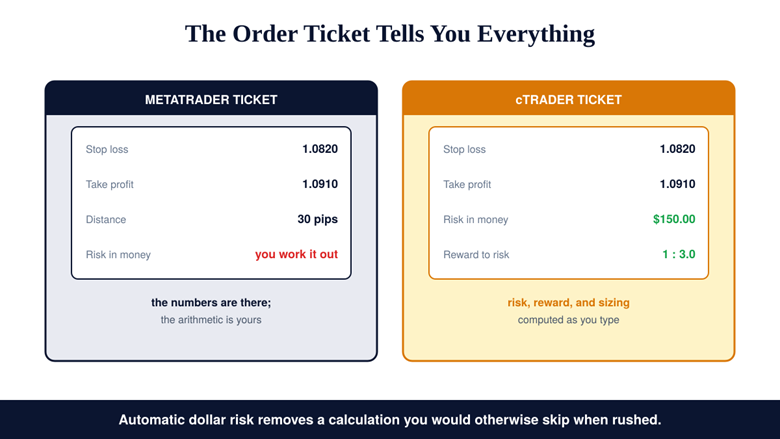
- cTrader's clearest practical edge is the order ticket: it displays money risk, reward to risk, and sizing automatically, where MetaTrader shows pips or price.
- cTrader is built around an ECN model with Level II Depth of Market, which is why many manual scalpers prefer it.
- MetaTrader's biggest edge is automation scale: Expert Advisors in MQL have a very large marketplace, while cTrader's cBots use C# with a smaller community.
- MetaTrader is offered by almost every broker and MT5 adds multi-asset access; far fewer brokers offer cTrader.
The Short Answer
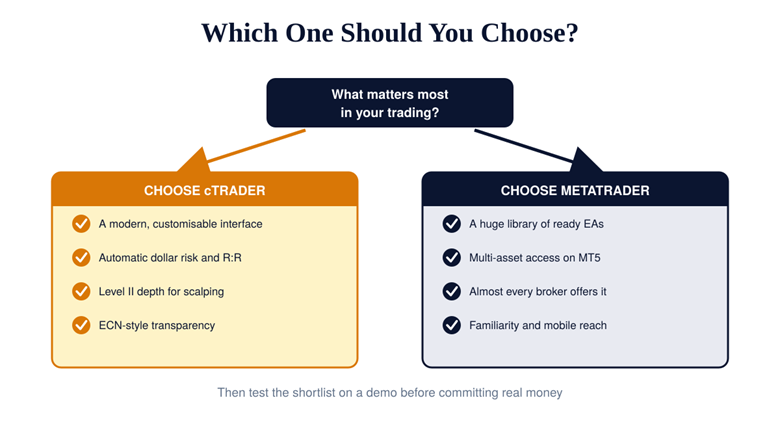
Choose cTrader if you want a modern, customisable interface, automatic money-risk display on every order, and Level II depth for fast manual execution. Choose MetaTrader, and specifically MT5, if you want the largest library of ready-made automated systems, multi-asset access beyond forex, and near universal broker support. Then test whichever you shortlist on a demo before committing capital, because the platform you execute well on matters more than the one that reviews better, and neither choice substitutes for sound risk management.
Risk Disclosure
CFDs are complex instruments and come with a high risk of losing money rapidly due to leverage. You should consider whether you understand how CFDs work and whether you can afford to take the high risk of losing your money. Past performance is not indicative of future results. This content is provided for educational purposes only and does not constitute investment advice.
A Quick Timeline: MT4, MT5, and cTrader
MetaTrader 4 arrived in 2005 and became the retail forex standard, which is why its habits and its MQL4 codebase are still everywhere. MetaTrader 5 followed in 2010, adding more timeframes, an improved strategy tester, and multi-asset support covering stocks, commodities, and futures alongside currencies. cTrader is the newer arrival, designed from the start around execution speed, a modern interface, and automation written in C# rather than a bespoke scripting language.
Interface and Usability
cTrader wins this category with little argument. Its interface is cleaner out of the box, more customisable in layout, and generally easier for a newcomer to navigate without a tutorial. MetaTrader 4’s interface shows its age in ways that are hard to unsee once you have used something modern, and while MT5 improved the look and added flexibility, it remains the more rigid of the two. The practical caveat is that familiarity beats elegance in a hurry: an interface you have used for five years may serve you better under pressure than a prettier one you learned last week.
Order Management and Risk Display
This is cTrader’s most concrete advantage, and it is more consequential than it sounds. MetaTrader expresses stop loss and take profit in pips or price levels, leaving you to convert that distance into money and into a position size yourself, or to add a tool that does it. cTrader displays the money at risk, the reward-to-risk ratio, and the sizing implications directly in the order ticket as you set the levels. Since the most common failure in retail trading is sizing a trade by feel rather than by a fixed rule, a platform that computes deliberate position sizing while you type removes a step traders skip precisely when they are least calm.
The same trade in two tickets: MetaTrader gives you the levels, cTrader gives you the consequences.
Q: Can MetaTrader show money risk too?
A: Not natively in the standard order window, but the gap closes with tooling: a risk-to-reward indicator or a position-size script can display the same figures on an MT5 chart. The difference is that cTrader does it by default while MetaTrader needs you to install and trust an add-on.
Execution Model and Depth of Market
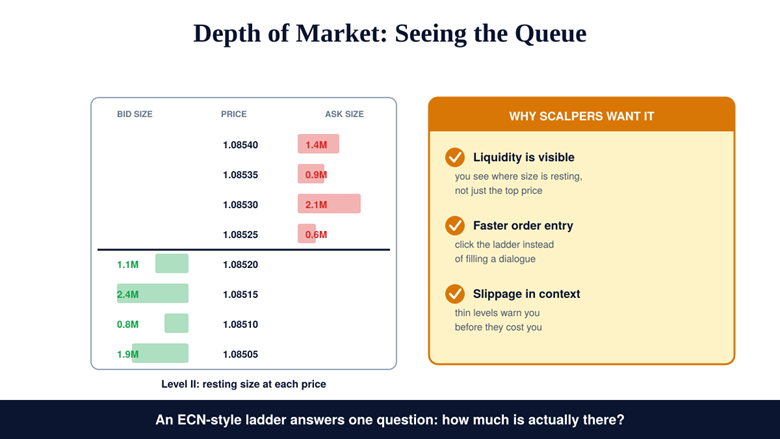
cTrader is built around an ECN, no-dealing-desk model with direct market access, and it exposes Level II Depth of Market: the resting size at each price rather than just the best bid and offer. For a scalper, that visibility is a working tool. You can see whether liquidity behind the current price is thick or thin, click the ladder to enter rather than fill in a dialogue, and judge slippage risk before it is charged to you. MetaTrader can display depth where a broker supports it, but its execution character depends far more on the broker’s own model, and the retail landscape mixes models widely enough that European product-intervention rules exist partly to standardise the protections around them.
Level II shows the queue rather than just the price, which is why fast manual traders value it.
Automation: Expert Advisors vs cBots
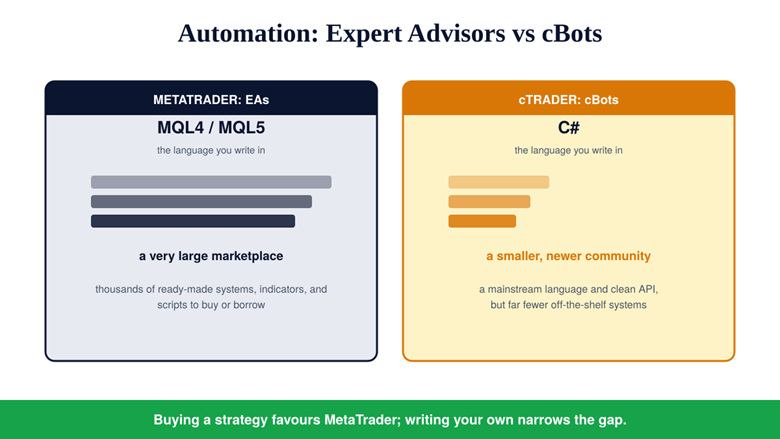
Here the advantage reverses decisively. MetaTrader’s Expert Advisors are written in MQL4 or MQL5, and two decades of adoption have produced an enormous marketplace of ready-made systems, indicators, and scripts, plus a community that has already answered most questions you will have. cTrader’s cBots are written in C#, which is a mainstream language with better tooling and a gentler learning curve for anyone with programming experience, but the community and the off-the-shelf library are much smaller. The split is clean: if you intend to buy or borrow a strategy, MetaTrader is the easier route, and if you intend to write your own and validate it through out-of-sample backtesting, cTrader’s language advantage matters more than its smaller catalogue.
MQL brings scale and a marketplace; C# brings a mainstream language and a smaller community.
Mini Example: Two Traders, Two Correct Answers
A trader wants to run three purchased grid and trend systems on a single account and monitor them with minimal coding. MetaTrader 5 is plainly the better fit: the systems already exist in MQL, the strategy tester is mature, and the community will have documented the pitfalls.
A second trader is a software developer who wants to build one custom execution algorithm around a ladder and manage it by hand. cTrader fits better: C# is familiar, the API is clean, and the Depth of Market view is part of the platform rather than a broker-dependent extra. Same question, opposite answers, both correct.
Charting, Copy Trading, and Mobile Access
cTrader ships with a large set of built-in indicators, commonly cited as more than seventy, and its web and mobile applications are strong enough for genuine work rather than monitoring alone. MetaTrader leans more on third-party indicators and add-ons, and its web access varies with the broker’s implementation, though its mobile apps are mature and almost universally available. Both offer a route into copy trading: cTrader has its own copy service, while MetaTrader’s ecosystem provides signals subscriptions. The distinction is less about capability than about where you would rather have the ecosystem, inside the platform or around it.
Broker Availability: Often the Deciding Vote
In practice this factor settles more decisions than any feature. MetaTrader is offered by almost every retail broker, which is a direct consequence of how decentralised the foreign exchange market is: the BIS triennial survey describes a fragmented over-the-counter structure in which a widely-adopted common platform is enormously convenient for brokers and clients alike. Far fewer brokers support cTrader, so a trader who prefers it may find that their chosen broker, spread structure, or account type simply is not available on it. Check which platforms your broker supports, and on which account types, before falling in love with an interface.
Feature by Feature
The table below condenses the comparison into the dimensions traders actually weigh. Read it as a profile of priorities rather than a scoreboard, because most rows favour one platform without damaging the other.
| Feature | cTrader | MetaTrader (MT4 / MT5) |
|---|---|---|
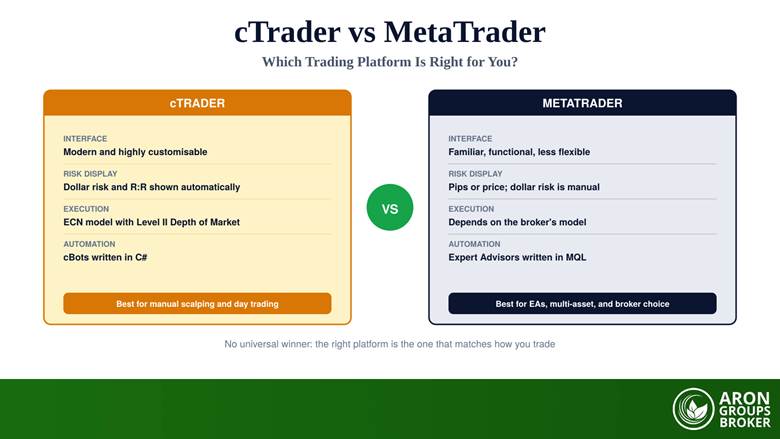
| Interface | Modern, highly customisable | Familiar and functional, less flexible |
| Built-in indicators | Large set included | Smaller core set, heavy third-party market |
| Order ticket | Money risk and reward to risk automatic | Pips or price; money risk calculated manually |
| Depth of Market | Level II included, ECN model | Available where the broker supports it |
| Automation language | cBots in C# | Expert Advisors in MQL4 or MQL5 |
| Automation ecosystem | Smaller, newer community | Very large marketplace and community |
| Backtesting | Capable built-in tester | Mature tester, especially on MT5 |
| Copy trading | Native copy service | Signals ecosystem around the platform |
| Web and mobile | Strong web and mobile apps | Mature mobile; web depends on broker |
| Broker availability | Offered by relatively few brokers | Offered by almost every broker |
| Best for | Manual scalping, day trading, ECN transparency | EA users, multi-asset trading, broad broker choice |
Eleven dimensions, two profiles: cTrader optimises the manual workflow, MetaTrader optimises reach and automation.
Which Should You Choose?
Pick cTrader if your edge is manual and time-sensitive: scalping or active day trading where a ladder, automatic money risk, and a fast, modern interface reduce friction on every order. Pick MetaTrader 5 if your edge is automated or diversified, if you want the largest catalogue of existing systems, or if you value being able to keep the same platform when you change broker. If you are still undecided, run both on a demo account for two weeks using the same strategy and judge them on your own execution quality rather than on feature lists.
A Note on Regional Availability
One practical point that feature comparisons rarely mention: platform availability is not uniform worldwide. Access to some trading software and services is restricted in certain jurisdictions, and the rules change, so a platform that a review recommends may or may not be usable where you live. Before choosing, confirm with your broker which platforms they support for clients in your country and on your account type, and check that you can meet any verification requirements. Regulators’ advisories on retail forex trading are worth reading on this point, because they are consistently blunt that knowing who you are dealing with, and under which rules, is a trader’s first line of defence.
Where Aron Groups Fits
Aron Groups runs on MetaTrader 5, which places it firmly in the ecosystem camp: Expert Advisors, a mature strategy tester, multi-asset symbols, and mobile apps that work the same way on every device you log in from. If the cTrader feature you most envy is the automatic money-risk figure, that gap is closable on MT5 with a risk-to-reward indicator, which puts the same discipline on the chart without changing platform.
The sensible sequence is to rehearse before you commit: open a demo, run your strategy on it for a fortnight, and only then move to a small account where micro volumes keep the first live lessons affordable. Judge the outcome the way a professional trader would, by a steadier equity curve across many trades rather than by which platform felt nicer on day one.
Conclusion
cTrader and MetaTrader solve the same problem with different priorities. cTrader optimises the manual workflow: a modern interface, money risk and reward to risk computed for you, and Level II depth in an ECN model. MetaTrader optimises reach and automation: an enormous Expert Advisor marketplace, multi-asset access on MT5, and support from nearly every broker on the planet.
So the honest recommendation is a question rather than a name. Is your edge expressed by hand, in seconds, at a price ladder, or by code and diversification across markets? Answer that, confirm the platform is available through your broker in your region, then test it on a demo. Whichever wins, capital preservation and the plan behind the orders will matter far more than the software that sends them.
Frequently Asked Questions
Quick answers to the questions traders ask most when choosing between cTrader and MetaTrader.
Is cTrader better than MetaTrader?
Neither is universally better. cTrader is better for a modern interface, automatic money-risk display, and Level II depth for manual scalping. MetaTrader is better for automation scale, multi-asset access on MT5, and broker availability. The right answer follows from your trading style.
What is the main difference between cBots and Expert Advisors?
The language and the ecosystem. cBots are written in C#, a mainstream language with strong tooling but a smaller trading community. Expert Advisors are written in MQL4 or MQL5, which has a very large marketplace of ready-made systems and far more community support.
Does cTrader really show dollar risk automatically?
Yes. Its order ticket displays the money at risk, the reward-to-risk ratio, and sizing implications as you set your stop and target, where MetaTrader shows the levels in pips or price and leaves the conversion to you or to an add-on indicator.
Why do fewer brokers offer cTrader?
MetaTrader established itself as the retail standard from 2005 onward, so brokers built their infrastructure, bridges, and client habits around it. Adding a second platform is a cost, which is why cTrader tends to appear at brokers positioning specifically on ECN execution and interface quality.